没有结果
尝试另一个关键词
Search for brands, model, category and more...
Loading...

深受 10,000+ 位快乐高尔夫球手喜爱


我刚在我的商业高尔夫模拟器上安装了这款新的 Pro+ 屏幕。旧款和这款新屏幕之间的差别令人惊叹。它不仅安静得多,而且画面投影也清晰得多。它使用弹力球安装得非常紧,但几乎没有明显的回弹。我毫不含糊地推荐 Pro + 击球屏。
Adam S.
天气对我来说不再是问题,我可以同时在车库里,又在奥古斯塔的第7洞!
B Edwards
高尔夫团队喜欢使用 Puttout 训练垫进行练习。练习越多,球场上的推杆表现就越好。该产品质量非常出色。
Boliver
我家里原本就有一个很大的健身房,不过我也想开始在家练习高尔夫,同时让自己更健康。我不想要内置式方案,所以 simbox 围网是完美的解决方案。它让我可以把它放在房间里我想放的任何位置,这一点很加分,因为我没法把它靠墙摆放。simbox 的品质无可挑剔,我选择了 Close Knit Baffle 屏幕,因为按照我的练习量,我想要最耐用的屏幕,而且它也非常安静,这也是一大优点。非常感谢 Golfbays 团队,真的怎么感谢都不够,所有工作人员都非常专业,一看就知道他们都有高尔夫背景。我一定会推荐。
H.P.
这是一台卓越的机器,Golf Bays 的送货速度很快,客户服务也很出色。这是我第二次从 Golf Bays 购买,他们每次都表现出色,我非常推荐!
Jonathan
坚固的网足够结实,适合练习开球杆以及球包中的其他每一支球杆。回球坡非常实用,省去了你去捡球的麻烦,球会直接滚回你的脚边。如果在花园中使用,建议另外购买一些重型地锚或地钉将其固定。
Liam
品质极佳,安装简单,送货也很快。已经无可挑剔了。我们还购买了一台投影仪和保护外壳,也非常出色。整体打造出非常专业的安装效果。
Luke M.
质量很好,易于组装,送达后几个小时内就开始打球了,而且是在48hrs内送达的。还需要再添置一些物品才能把房间布置得完美。会再次购买。
Mark W
包裹送达非常迅速,还包含清关,完美。SimBox 超出了我的预期,黑色球体防噪效果非常好,Impact Screen Pro+ 非常适合 Full HD。多亏了视频教程,它也可以一个人安装,不过两个人会轻松得多。简直完美,强烈推荐,得益于 6 种尺寸,家里总能找到合适的位置,只要房间高度合适即可。质量非常令人信服。简而言之:非常适合家用模拟器
Markus K.
设置起来既简单又轻松。软件有一些小问题,但给 golfbays 团队打个电话就很快解决了。我推荐 TGC2019 用于游戏体验。还没试过 Skytraks 自己的球场,但我相信它们也不错。
Peter H
对草坪的质量非常满意,也会强烈推荐给别人。
Scott W

GolfBays 让每个人都能轻松体验高尔夫模拟。
我们这家全球化(但由家族经营)的企业,为各类模拟器组件提供公正客观的建议——从屏幕到软件。凭借 PGA 专业人士的专业知识指导我们的甄选,我们帮助英国及其他地区的家庭和企业打造理想的练习空间。
我们的支持在您购买后仍将持续——因为您的满意是推动我们不断前进的动力!
深受 10,000+ 位快乐高尔夫球手喜爱
观看客户对我们的模拟器进行实测。
周末爱好者信赖的同一项技术,也被世界顶级球员所信赖。以精确到位的准确度追踪每一次击球,真正提升你的球技。
可根据任何空间或预算调整您的模拟器。我们为从车库空间到定制商业场所的各种需求设计解决方案。
仿佛置身球场,感受真实的球飞行物理和逼真的画面,畅游世界顶级虚拟球场。
经久耐用,可承受数千次满功率驱动。我们的屏幕和外壳在劣质产品失效后仍能持续出色运行。
清晰的视频指南和免工具组装意味着您将在几个小时内而不是几天内就能开始击球。无需专业知识。
通过免息分期付款分摊费用。立即获取您的模拟器,按可承受的月供分期付款。
深受 10,000+ 位快乐高尔夫球手喜爱
深受 10,000+ 位快乐高尔夫球手喜爱

包裹送达非常快,甚至包括清关,完美。SimBox 超出了我的预期,黑色球体防护非常隔音,Impact Screen Pro+ 对全高清效果非常好。多亏了视频教程,一个人也能安装,不过两个人会轻松得多。 简直完美,强烈推荐,由于有 6 种尺寸,只要房间高度合适,家里总能找到合适的位置。 质量非常令人信服。总之:对家庭模拟器来说非常棒。
Markus Kocher

原装的围栏就已经很好了,这次算是大升级。Golfbays 很难被超越……。
Ian Moore

我们为我的高尔夫俱乐部 Alderley Edge GC 的布置一起购买了这个围栏,和其余配套一起安装后,它放在闲置的斯诺克室里看起来非常棒。它已经被频繁使用,却没有任何磨损迹象,而且这些人合作起来非常轻松。会再次购买。
Sean Hall

我刚在我的商用高尔夫模拟器里安装了这款新的 Pro+ 屏幕。旧款和这款新屏幕之间的差异令人惊叹。它不仅安静得多,而且投影画面也清晰得多。它使用蹦极球固定得相当紧,但几乎没有明显的回弹。我毫无保留地推荐 Pro + 击球屏幕。
Adam Smith

我最近安装了一套完整的 Protee VX 高尔夫模拟器房间,我非常满意,只能说,哇!非常感谢 Rob、Harrison @Golf bays 以及团队带来如此出色的体验,从销售到安装,整个过程都非常顺畅,安装质量堪称一流。我强烈推荐 Golf bays,感谢你们提供的卓越服务。
Iain Hackett

看看 GolfBays 的实际应用!
不确定哪种配置更适合您的需求?立即预约一次免费咨询!我们的团队将根据您的空间和预算,为您讲解量身定制的方案。您可以亲自体验我们的技术产品,或在咨询通话中直接提问——完全没有任何义务。
深受 10,000+ 位快乐高尔夫球手喜爱
在 GolfBays,我们会在您模拟器之旅的每一步为您提供支持:
我们的高品质高尔夫模拟器产品深受 PGA 职业球员和知名全球品牌信赖,无论是家庭练习还是教练训练场景——GolfBays 都能提供配得上职业选手的设备。
高品质模拟器,不用承担令人咋舌的价格。无论是商用配置还是家用方案,我们都能覆盖各种预算和空间需求。使用我们的 0% 贷款方案,今天就开始提升表现,不受预算限制。
我们的屏幕和外壳能毫无怨言地承受最猛烈的撞击,专为抵御劈击和完美击球而打造。多年后依然表现出色?这就是我们兑现的品质承诺。

Oliver
(运营总监)
Oliver@Golfbays.com
Oliver 确保一切顺利运转——从销售和发货到供应商关系。他拥有电信和金融背景,为 GolfBays 带来一流的管理专业能力。他还曾有过一段独特经历:为 Sky One 的一档节目在 Elstree Studios 搭建高尔夫模拟器!工作之余,Oliver 喜欢足球,也喜欢和家人共度时光。

Harrison
销售与高尔夫科技专员
Harrison@Golfbays.com
Harrison 是一名合格的 PGA 职业教练,在高尔夫行业拥有超过 5 年的教学经验。
Harrison 还拥有超过 10 年的高尔夫行业知识,能够帮助您打造结合最新高尔夫技术、满足您需求的专属高尔夫模拟器。
Harrison 的日常工作包括线上咨询以及线下最新技术演示。他还为 Instagram、Facebook、YouTube 和网站制作社交媒体内容,测试并评测新产品。他也曾代表 GolfBays 出席企业活动,包括在利物浦 Albert Docks 举办的 The Open,以及为 Scottsdale Golf 在伦敦 The Shard 顶层举办的活动。
您知道吗,Harrison 的首次电视亮相是在购物频道 Ideal World!
工作之余,Harrison 喜欢打高尔夫,也喜欢外出享用美食和小酌

Jack
Logistics & Customer Support
Jack@Golfbays.com
Jack 在酒店行业从事客户服务岗位已有超过 10 年的经验。他拥有体育商业管理与教练专业学位。
Jack 可谓是“样样精通”,他的日常工作包括通过在线聊天和电话提供客户服务支持,以及负责销售、国际出口和国内运输。Jack 甚至还协助 Merv 完成过几次高尔夫模拟器安装项目。
你知道吗?Jack 是家族企业之外聘用的第一位员工。Jack 在 GolfBays 工作已超过 3 年,并且随着公司的发展一同成长。
在业余时间,Jack 喜欢打高尔夫和橄榄球。他还是 Liverpool FC 的忠实支持者。他也喜欢旅行,此前还曾在澳大利亚待过 8 个月!

Jamie
销售 - 技术支持
Sales@Golfbays.com
Jamie 是一名合格的 PGA 职业教练,在高尔夫行业拥有超过 27 年的经验。
Jamie 在高尔夫模拟器行业也有超过 10 年的经验,负责 Pro-Tee 的销售与开发工作。
Jamie 的日常工作包括针对最新技术提供在线咨询和现场演示,并通过电话或视频通话为我们所有客户提供技术支持。
Jamie 仍然定期参加 PGA 赛事。

Merv
仓库总监
sales@Golfbays.com
Merv 作为一名工程师,拥有超过 40 年的金属加工与制造专业经验。
Merv 是 GolfBays 的共同所有人之一,负责我们仓库的运营工作。他的日常职责包括打包您的包裹、确保您的订单发出、裁切您的草皮,以及担任指定的叉车司机!
您知道吗,Merv 想出了“GolfBays”这个公司名称。早些年,我们的第一个高尔夫球位是一个室内围挡,用来抵御天气影响。那时候室内工作室还没有真正流行起来,而市面上的相关产品价格高得惊人。
不打包您的包裹时,Merv 喜欢打高尔夫,也喜欢去当地酒吧喝点东西、吃点美食。

Jayne
设施
Sales@Golfbays.com
Jayne 在一所高中担任助教已有超过 15 年的工作经验,并带来了丰富的组织协调专业知识。
Jayne 的日常工作包括将定制防撞纱门订单交给我们的缝纫师 Sue 进行修改,在仓库协助 Merv 打包、负责办公室的日常整理,以及协助 Rob 处理各项事务。
你知道吗?Jayne 拥有园艺方面的 City and Guilds 资格证书,工作之余,她喜欢园艺、陪伴孙辈,以及外出享用美食和饮品。

James
创意总监
james@Golfbays.com
James 在过去 6 年里一直担任专业摄影师和摄像师。过去 2 年,James 一直参与为 Golf Bays 创作和编辑内容。
James 的日常工作包括为 GolfBays 的社交媒体和 YouTube 频道拍摄并剪辑视频、为网站拍摄产品照片,以及运营全新的 GolfBays Podcast - 让它更有视角 👀
工作之余,James 还是一位热衷的业余高尔夫球手,差点为 4

Victor
营销达人
victor@golfbays.com
Victor 拥有超过 9 年的体育效果营销经验。
Victor 的日常工作包括管理 GolfBays 的营销活动,跟踪并分析客户数据,确保你能找到自己想要的产品。
工作之余,Victor 喜欢打网球,也喜欢吃三分熟的肋眼牛排。他来自摩尔多瓦,喜欢阅读传记、投资股票和喝鱼汤。他妈妈觉得他“工作太拼了”,应该“找个女朋友!”

Rob
创始人兼董事
Rob@Golfbays.com
Rob 是 GolfBays 的创始人,并且作为 PGA 职业教练在高尔夫行业拥有超过 10 年的从业经验。
Rob 一直富有创业热情。你知道吗?Rob 最初创办 GolfBays 时只是把它当作一项副业,为企业活动提供充气高尔夫设备租赁服务,并在 eBay 上销售高尔夫幕布,而业务也很快发展起来。由于增长迅速,GolfBays 如今已成为英国乃至全球同类业务中规模最大、知名度最高的独立高尔夫模拟器企业之一。
Rob 负责业务管理,并持续为 GolfBays 提供支持,包括战略规划和业务发展。
不工作的时候,Rob 喜欢跑步,也喜欢外出喝酒和用餐。
为了使用任何球杆都能舒适挥杆,我们建议:
对于现货商品,请预留1-4天。我们也提供全球配送。
它们的设计非常便于搭建和拆卸。整个过程大约需要 30 分钟。每套套件都附带分步视频指南,帮助您顺利完成。
是的,包含一块 HD Simbox 屏幕,以及支架、黑色围挡和您所需的一切。您还可以选择升级为 Close-Knit Baffle 和 PRO+ 屏幕,以获得更高的耐用性和更好的画面效果。
我们所有的产品都在总部经过长时间测试。GolfBays SimBox 屏幕和围护结构可承受超过 200mph 的球速。众多 PGA 职业选手也在使用它,这足以证明其品质。
可以。请 联系我们 并告知您的具体需求,我们会尽最大努力满足您的要求。我们始终会尽量在您的空间限制内进行工作。
是的,除了 quad pro 和 Pro+ 击球屏幕。
与大多数供应商不同,我们为所有屏幕提供至少 6 个月保修,让您更安心。请确保使用干净的球和球杆,以延长屏幕的使用寿命,因为它们需要不时更换。
探索室内高尔夫和高尔夫模拟技术的最新见解、技巧和趋势。

You can hit drivers into a screen all winter, but the putter is still the club that decides the card. You can putt on a golf simulator, as long as the launch monitor reads putts and the software knows what to do with them. Here's how simulator putting works, which setups do it well, and the turf, mats and lighting that make it feel like a real green.
Quick summary
Yes, as long as your launch monitor can read a putt and your software supports putting. When both are true, you make a real stroke, the ball rolls off towards the screen, and the software plays the rest of the putt out on the virtual green, break and all.
When they aren't, the software putts for you. Either way, simulator software gives you 3 ways to finish a hole:
You can mix them: putt out when practising, gimmes when 4 of you are playing a round on a school night.
It comes down to how your launch monitor reads the ball. The software only draws what the launch monitor tells it, so a putt the launch monitor can't measure is a putt the software can't show.

Camera units sit beside the ball, across from you, and photograph it at impact. Ball speed and direction off the face are what the software needs to roll the putt out, and a camera reads both before the ball has rolled anywhere.
That's why putting is a strength of the camera launch monitors that sit beside the ball, and why they suit smaller rooms too: they need about 4.5m of depth, against 5m for a radar unit behind you.
Radar units sit behind you and measure the ball as it travels away from them. For a full shot that's straightforward: the Garmin R10, for example, wants at least 2.4m of ball flight indoors. A putt is slow and stays on the ground, which gives the radar far less to work with.
So radar units tend to handle putting less well. If you're on radar, keep the roll flat and clear all the way to the screen, so the unit sees as much of each putt as it can.
| Type | Where it sits | How it reads a putt | Putting |
|---|---|---|---|
| Camera launch monitor | Beside the ball, across from you | Photographs the ball at impact | Reads putts well; the one to choose if putting matters |
| Radar launch monitor | 1.8m to 3m behind the ball | Tracks the ball as it travels | Less reliable on short, slow putts; gimmes and auto-putt fill the gap |
| Dedicated putting simulator | On a stand on its own mat | A camera tracks the ball and the putter | Putting only, in detail |
Any simulator can finish a hole, but only one built on a launch monitor that reads putts lets you putt it out. The home golf simulators that putt well all start there, so check the launch monitor's listing for a putting mode, not just short game data.
The Square Golf launch monitor is the clearest example at the budget end. Its high-speed camera sits beside the ball, and its putting practice lets you adjust the green speed and work on short, medium or long putts, with feedback on distance control, ball speed and the putt's trajectory, for £689.
The catch: it stays indoors, and a left-hander has to lift it over to their side of the mat before they putt.
 Shop now →
The Garmin Approach R10 is the radar example. In Garmin's own Home Tee Hero there's no live putting: it gives you your putts based on how close your approach finished, and third-party software handles putting its own way. It's £421, down from £499. The catch: you never hit a putt in Home Tee Hero, so if putting every hole matters to you, check how your simulator software handles putting before you buy.
Once the launch monitor has read the putt, the software decides how the green behaves and how strict it is with you. GSPro gives you plenty to set, from gimme circles and fixed-distance auto-putt to a stimp setting that defaults to 10, a green heat map and a putting assist (GSPro).
 Shop now →
A year of GSPro is £250 at GolfBays, with a version for each supported launch monitor: Uneekor, FlightScope, Full Swing KIT, ProTee VX, and an open connection for the others.
A gimme counts a short putt as holed. GSPro draws a gimme circle round the hole, and anything that stops inside it is picked up. Gimmes keep a round moving; putting everything out keeps you honest.
✓ Do this
Putt out the short ones when you're practising, even inside the gimme circle, so you hole the 1m ones you'd have to hole on Sunday.
✕ Not this
Practise all winter picking up everything inside the gimme circle, then wonder why 1m putts at the club feel like 3m ones.
Auto-putt skips the green and gives you a number of putts instead. It's the answer for a launch monitor that doesn't read putts, and for a round where nobody wants to watch a mate line up a 1m putt from 3 angles. In GSPro, the fixed-distance version isn't supported in Simulator Golf Tour events or online play.
Green speed is measured on the stimp scale. A stimp reading is the average distance in feet a ball rolls on a flat part of the green after it's released from a standard ramp, the Stimpmeter, so a green running 10 rolls the ball 10 feet, about 3m (USGA).
In the software, a higher number is a faster green. GSPro defaults to 10, with stimp 6 and 7 among its slower settings, and the Square Golf lets you adjust its green speed to suit your stroke. Set it for the greens you actually play, not the ones on the telly in April.
On a real green you read the slope with your feet as much as your eyes. In a simulator the floor is flat and the slope is drawn, so the software helps: GSPro has a green heat map on the Y key, plus putting auto aim and a putting assist.
Use them to learn how the software's greens break, then turn them off. Read the putt first, pick your line, and check the heat map afterwards, or you'll only ever putt to the arrow.
Want a bay you can putt in?
Tell us about your room and your launch monitor, and we'll plan the turf, where the mat sits and how the putting line runs to the screen. It's free.
Book a free consultationA simulator putts best on a surface that rolls like a green, in a room where the launch monitor can see the ball. That comes down to 4 things: turf, a mat or green for serious practice, a dedicated putting simulator if putting is all you're after, and light.
Start with turf across the bay floor, from the back wall to the screen. You get a surface made for putting, and something softer than concrete to stand on between shots.
Set the hitting mat flush with the turf, so a putt rolls off the mat and on towards the screen without a bump. It costs no extra floor space either, because in a simulator room layout the putting area is the turf between the hitting mat and the screen.
 Shop now →
GolfBays Putting Turf has an 11mm pile and comes off a 4m-wide roll, in lengths from 1m to 20m, at £24 a square metre.
 Shop now →
GolfBays Premium Putting Turf has a deeper 16mm pile on the same 4m-wide roll, at £36 a square metre.
| Length off the 4m roll | Area | Putting Turf, 11mm | Premium Putting Turf, 16mm |
|---|---|---|---|
| 1m | 4m² | £96 | £144 |
| 2m | 8m² | £192 | £288 |
| 3m | 12m² | £288 | £432 |
| 4m | 16m² | £384 | £576 |
| 5m | 20m² | £480 | £720 |
Watch out: a seam across the putting line
Our turf comes off a 4m-wide roll, so any bay up to 4m wide can be laid in one piece. Order the length to match the room's depth and trim the width, rather than covering the width and joining a strip on the end, or every putt you hit rolls over the seam.
 Shop now →
To hole out on the turf itself, the GolfBays Shallow Putting Cup sits on any flat surface: turf, a mat or carpet. It's shallower than a real hole, so it rewards putts struck at the pace that would drop on the course. It's £14.99.
If turf across the floor isn't an option, or you want targets and breaks to practise on, a mat or a green does the job and rolls up or packs away afterwards.
 Shop now →
The PuttOut Large Putting Mat is 367cm by 67cm, printed with alignment lines, 5 targets and distance markings up to about 3m (10ft), and it reads 10 on the stimp. It rolls flat out of the box and comes with a carry bag, for £129.99.
A flat mat teaches pace and start line. For break, the PuttOUT AirBreak has a flexible base you raise and lower with air pumps, for hundreds of slope combinations. It has a 108mm hole for real lip-outs, a battery-powered ball return, a stand-on podium to putt from and a green-reading app that sets up specific breaks, and the rubber-backed mat runs 10 on the stimp. It's £269.99, down from £319.99.
The catch: it's a standalone practice mat, so these putts don't play out on the simulator screen.
 Shop now →
For a proper green rather than a mat, the GolfBays Modular Putting Green is 305cm by 103cm, with pre-cut turf and regulation cups on a base that clicks together. It rolls at around 10 on the stimp, ships in 2 boxes and costs £399, down from £499.
If putting is all you want to practise, you don't need a full simulator. A dedicated putting simulator is a camera and a mat that do one job, and they fit in a lounge.
The ExPutt RG uses a high-speed camera on a small stand on its mat to track the ball and the putter. It plugs into your TV with the HDMI cable in the box, or runs on your phone through the app, and it measures ball speed, putter path, clubface angle, launch direction, impact angle, distance and tempo (ExPutt).
You can adjust the slope and length of each putt, putt on real course greens, Pebble Beach among them, and play your mates on the sofa or other ExPutt users online over Wi-Fi. It's £389.
The catch: the camera has no speaker of its own, so the TV needs one, and it's putting only: your driver stays in the bag.
Camera units, and the ExPutt's camera, have to see the ball clearly to read it. Poor light on the ball is one reason putts don't register, and a dim garage in December is poor light.
 Shop now →
The GolfBays Golf Simulator Light is a single LED spot on a 1m powered track, £175 in black or white, and it's there so the launch monitor can see the ball. Point it at the ball, not the screen, or you'll wash out the picture.
Adding putting costs anything from £14.99 for a cup to hole out in, to a few hundred pounds for turf or a dedicated putting simulator. These are GolfBays prices on 30 September 2026.
| What you add | What it does | Price |
|---|---|---|
| Shallow Putting Cup | A cup to hole out in on turf, a mat or carpet | £14.99 |
| PuttOut Large Putting Mat | A 367cm practice mat that reads 10 on the stimp | £129.99 |
| Golf Simulator Light | Light on the ball for the launch monitor | £175 |
| PuttOUT AirBreak | Adjustable breaks and a ball return | £269.99 |
| ExPutt RG | A putting simulator on your TV | £389 |
| Modular Putting Green | A 305cm green that packs away | £399 |
| Putting Turf, 5m x 4m | 11mm turf for a 3m by 4.5m bay | £480 |
| Square Golf launch monitor | A camera unit with a putting mode | £689 |
| Premium Putting Turf, 5m x 4m | 16mm turf for a 3m by 4.5m bay | £720 |
Worked example: putting in a 3m by 4.5m bay
GolfBays prices, 30 September 2026
| GolfBays Putting Turf, 5m x 4m (20m²), trimmed to 4.5m by 3m | £480 |
| Shallow Putting Cup | £14.99 |
| Golf Simulator Light | £175 |
| Total | £669.99 |
With Premium Putting Turf instead, the total is £909.99.
Simulator putting pays off when you practise with a plan, not when you knock a few at the screen between drives. These 4 drills work in any bay.
Ladder drill. Hit 5 putts each from 1m, 2m and 3m, then work back down. Note whether the misses finish short, long, left or right, and keep the score from week to week.
Breaking putts. If your software lets you place the ball on a green, hit the same breaking putt 10 times rather than playing a hole through to get one go at it. Change one thing at a time: the line or the pace, never both.
Lag putting. Set up putts of 10m and more and try to stop every one inside a 1m circle round the hole. Holing them is a bonus; the job is a tap-in next.
Pressure putts. Hole 5 in a row from 1m into the shallow cup on the turf. Miss one and start again, which gets tense faster than you'd think.
GolfBays tip
Match the software to the surface. Our modular green and the PuttOut Large mat both roll at around 10 on the stimp, and 10 is GSPro's default, so when you putt on either in the bay, the roll under your putter and the roll on the screen agree. Change one without the other and you'll spend the session fighting your own feel.
For your stroke, your start line and your pace, yes. For reading greens, less so.
Treat it as the place to groove your stroke and pace, and leave the real reading to the course.
A putting simulator is a camera and a putting mat that measure your putt and play it out on a screen. The ExPutt RG is one: a camera on a stand on its own mat, connected to your TV or phone, with real course greens to putt on. A full simulator with a camera launch monitor does the same job alongside every other shot.
Sometimes, but less well than with a camera unit. Radar measures the ball as it travels, and a putt is slow and stays on the ground, so radar setups often lean on gimmes and auto-putt. If you're on radar, keep the roll flat and clear to the screen.
Not in Garmin's own Home Tee Hero, which has no live putting and gives you your putts based on how close your approach finished. Third-party software handles putting its own way.
Start at 10 on the stimp, which is GSPro's default and about what the PuttOut mats and our modular green roll at. Then adjust it towards the greens you play most.
There are 3 things to check: that the launch monitor supports putting at all, that there's enough light on the ball, and that the ball sits inside the unit's hitting area.
No, but putting is better with it. You can putt off the hitting mat alone, but a putt that runs off the mat's edge onto a hard floor doesn't roll like one on a green. Our putting turf is £24 a square metre, or £480 for a 5m length that covers a 3m by 4.5m bay.
Put a green in your simulator
Putting turf by the metre, a modular green that packs away and the cup to go with them.
Shop putting turf and greens
A home golf simulator is 4 things working together: a launch monitor, an enclosure with an impact screen, a hitting mat and a projector. The launch monitor sets the price and decides how much room you need, so that's how we've picked. These are the 7 GolfBays packages we'd point most UK golfers to, grouped by the space you've got and what you want to spend.
Quick summary
Prices are GolfBays prices on 30 September 2026. Where a package comes in several enclosure sizes, the range runs from the smallest to the largest.
| Package | Launch monitor | Where it sits | Best for | Price |
|---|---|---|---|---|
| SkyTrak ST+ SimBox | SkyTrak+, camera and radar | Beside the ball | Most garages and spare rooms | £2,490–£2,890 |
| Square Golf EasySim | Square Golf, cameras | Beside the ball | Small rooms and tight budgets | £1,649–£1,849 |
| FlightScope Mevo Gen 2 SimBox | Mevo Gen 2, radar and camera | Behind the golfer | Deeper rooms, and the range | £2,250–£2,650 |
| Bushnell Launch Pro Indoor SimBox | Launch Pro i, 3 cameras | Beside the ball | Data you can trust | £3,159–£3,559 |
| Garmin Approach R50 SimBox | R50, 3 cameras and a screen | Beside the ball | Real courses with little setup | £5,499–£5,908 |
| Uneekor EYE MINI LITE Lux | EYE MINI LITE, cameras | Beside the ball | A premium, finished bay | £6,980 |
| Trackman iO Home SimBox | Trackman iO, radar and imaging | On the ceiling | A permanent bay with a clear floor | £14,050–£14,450 |
If you asked us for one package without telling us a thing about your room, this is the one. The SkyTrak+ reads the ball and club with a photometric camera and dual Doppler radar, and it sits beside the ball rather than behind you, so it works in the 4.5m of depth that most garages and spare rooms can find.
The package covers everything in the bay except the projector: the SkyTrak+, a SimBox enclosure, our PRO+ impact screen and a 1.5m × 1.5m hitting mat, plus a year of SkyTrak Core software. The SimBox frame clicks together without tools in under an hour, and it comes in 7 sizes, from 2.6m wide and 2.5m high up to 4m wide and 3m high.
The SkyTrak ST+ SimBox package costs £2,490 in the smallest size and £2,540 at 3m wide, which is the width we'd start from if the room allows. After the first year, SkyTrak's software is a yearly membership. Price that in before you choose between this and a FlightScope package that comes with courses to keep.
The catch: from year 2 the software is a yearly bill, so the cheapest package to buy isn't always the cheapest to own.
The EasySim is our cheapest complete simulator, and it's built for rooms that can't give up much floor. The enclosure is 3.3m wide, 2.5m high and only 1m deep, and its 4:3 screen shape makes choosing a projector simpler.
The Square Golf launch monitor uses high-speed cameras beside the ball. It reads ball speed, launch direction and angle, backspin and sidespin, plus club path, face angle, dynamic loft and angle of attack, so you get club data as well as ball data at this price. The room still has to fit a full driver swing, so the 1m depth saves space around the screen, not around you.
The Square Golf EasySim package is £1,649, or £1,849 with a hitting mat included. The Lite impact screen inside it is designed to stay quiet when the ball hits, which matters in a garage that shares a wall with next door.
The catch: the enclosure comes in one size, so it won't grow into a wider room, and with only 1m of depth you hit from closer to the screen than you would in a SimBox.
The Mevo Gen 2 combines 3D Doppler radar with image processing, which FlightScope calls Fusion Tracking. Like most radar units it sits behind the golfer and watches the ball fly, so it wants a deeper room than a camera unit does. We plan on 5m of depth for radar.
In return you get a monitor that's just as happy on a driving range, and software you own outright. Every Mevo Gen 2 comes with a lifetime E6 Connect bundle of 8 courses, including Valderrama and Kiawah Island's Ocean Course, for iOS and PC. Indoors, radar units generally read spin more reliably from a ball with a metallic dot on it, so keep a few dotted balls for the simulator.
The FlightScope Mevo Gen 2 SimBox package runs from £2,250 to £2,650 depending on the enclosure size, which undercuts the SkyTrak package at every size.
The catch: it asks more of the room. You'll want 5m of depth and a few dotted balls, where the SkyTrak manages in 4.5m with whatever ball you tee up.
The Launch Pro i is the indoor edition of Bushnell's Launch Pro. It measures impact with an auto-calibrating 3-camera system and infrared, so it sees the moment of impact rather than working out what happened from the ball's flight.
It sits beside the ball like the SkyTrak, so it suits the same rooms. The difference is the software: Bushnell sells simulation as yearly plans, so the package price isn't all you'll pay to play, and it's worth deciding which plan you want before you order.
The Bushnell Launch Pro Indoor SimBox package is £3,159 to £3,559 and includes the SimBox enclosure and our standard hitting mat.
The catch: the running cost. Add a year of the simulation plan to the price before you compare it with a package that comes with software to keep.
The R50 is a launch monitor with its own 10-inch touchscreen, so a lot of what other setups hand to a PC or tablet happens on the unit itself, and it can mirror that screen straight to a projector (Garmin). It uses 3 high-speed cameras to track more than 15 ball and club metrics, including spin rate and spin axis, indoors or out; some of the club numbers need the tracking sticker Garmin includes.
Garmin's Home Tee Hero puts more than 43,000 real courses on the screen with an active Garmin Golf membership, so your local course is probably in there. The R50 also works with third-party simulator software if you'd rather play in something else.
The Garmin Approach R50 SimBox package costs £5,499 to £5,908, a little over twice the SkyTrak package. What the extra buys is 3-camera tracking and a screen on the unit.
The catch: the 43,000 courses come with a subscription, because Home Tee Hero needs an active Garmin Golf membership.
The Lux is our top enclosure: 3.75m wide, 2.7m high and 1.5m deep, made for rooms that are staying a golf room rather than a garage with a net in it.
Inside it, the Uneekor EYE MINI LITE reads the ball with cameras from beside the mat. It runs from a Windows PC with an internet connection, and it works with Uneekor's own View, Refine+ and GameDay software as well as GSPro. You can expand the system with extra cameras later.
The Uneekor EYE MINI LITE Lux package is £6,980. Budget for the PC on top, because the EYE MINI LITE won't run without one.
The catch: the Lux comes in one size, 3.75m wide, 2.7m high and 1.5m deep, so the room has to take all of it and your swing as well.
Trackman iO is Trackman's first launch monitor built purely for indoor golf. It mounts on the ceiling, combines radar, infrared and high-speed imaging, and measures 3D spin and spin axis rather than estimating them.
Being overhead solves the 2 problems every floor unit has. There's no minimum distance in front of or behind the ball (Trackman), and nothing sits on the floor to trip over or catch with a follow-through, which counts for a lot when the family shares the room.
The Trackman iO Home SimBox package starts at £14,050 in the smallest enclosure.
The catch: apart from the price, it's fixed to the ceiling, so it suits a room that's staying a golf room, not a garage the car goes back into every night.
 Shop now →
If you want a ceiling unit without the Trackman price, the ProTee VX puts 2 high-speed cameras overhead, needs no marked balls and comes with GSPro, for £6,240.
Not sure which package fits your room?
Send us your measurements and we'll match a launch monitor and an enclosure size to them. It's free.
Book a free consultationAt least 3m wide, 4.5m deep and 2.8m high inside for a full driver swing, with a camera launch monitor beside the ball. A radar unit that sits behind you wants 5m of depth, and 4m of width lets left and right-handers take turns on the same mat.
| Where the launch monitor sits | Width | Depth | Height |
|---|---|---|---|
| Beside the ball (camera) | 3m | 4.5m | 2.8m |
| Behind the golfer (radar) | 3m | 5m | 2.8m |
| Shared by left and right-handers | 4m | 4.5m to 5m | 2.8m |
Height is the number that rules most rooms out. Plenty of British garages have a 2.4m ceiling, which a full driver swing won't clear for most adults, so measure the space a simulator needs from the ceiling down before you measure anything else.
Where the launch monitor sits changes more than the depth. Camera units beside the ball, like the SkyTrak+, Square Golf, Bushnell, Garmin R50 and Uneekor, read the ball at impact, so they need the least room and read putts well, but a left-hander has to move them to the other side of the mat. Radar behind you, like the Mevo Gen 2, needs the depth and dotted balls indoors, and pays you back on the driving range. Ceiling units clear the floor, at a price.
If the house has no room to spare, a garden room built around the swing gets you the height that garages lack, and a Trackman iO or ProTee VX on its ceiling keeps the floor clear.
Watch out: radar in a short garage
A radar unit behind the golfer needs room to watch the ball fly. Squeeze one into a 4.5m garage and either the unit ends up too close to the ball or you end up too close to the screen, and the numbers suffer. If the room is short, go camera.
Our packages cover the launch monitor, enclosure and screen, and some include a hitting mat. 3 things usually aren't in the box: a projector, a PC or tablet to run the software, and the software itself once any included year runs out.
 Shop now →
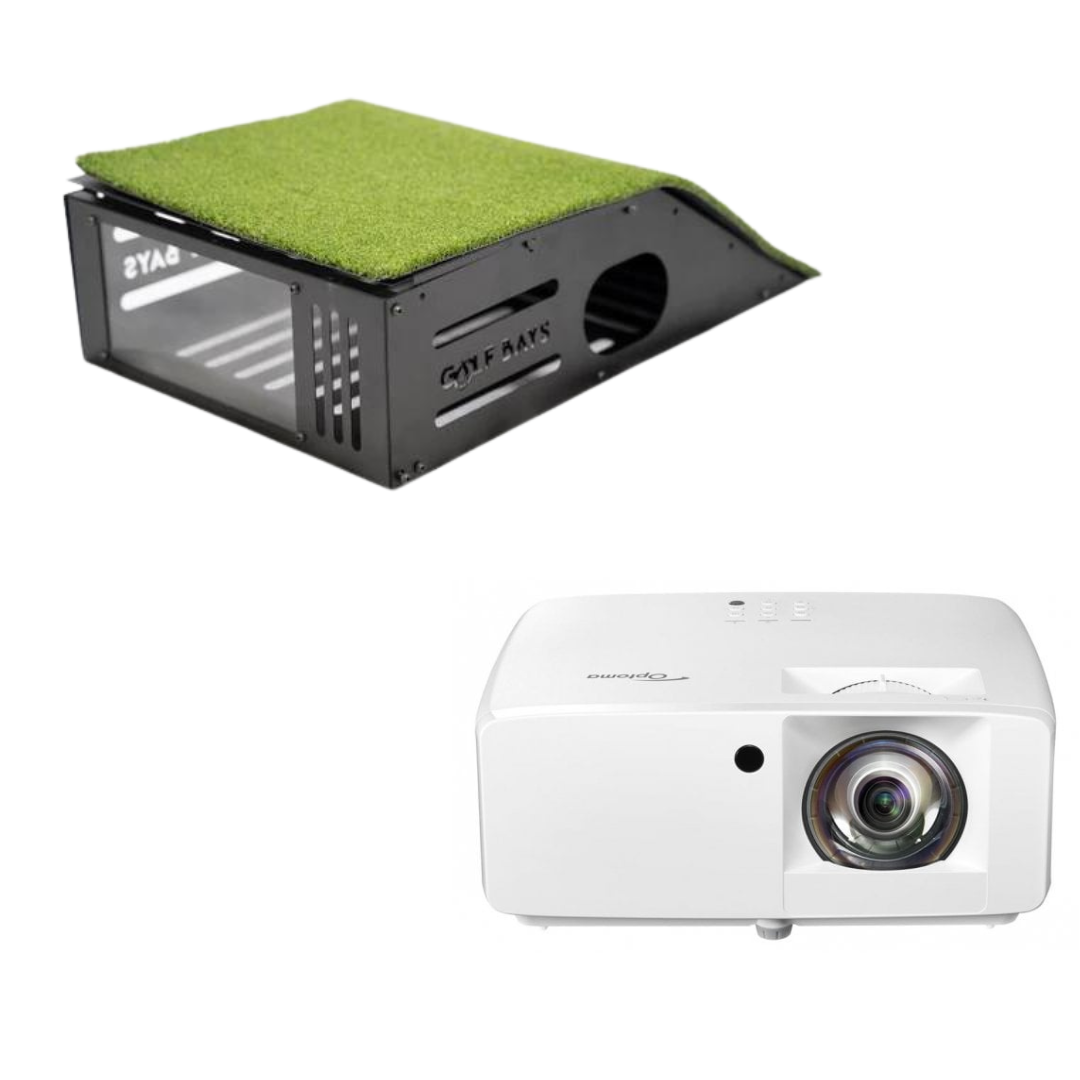
A short throw projector sits close to the screen, so you don't cast a shadow over the ball. The Optoma GT2200HDR is a full HD short throw at £899.
Brightness and throw distance matter more than resolution in most garages, so picking a simulator projector starts with the distance from the lens to the screen.
 Shop now →
For software, GSPro costs £250 a year, runs on a Windows PC and works with most of the launch monitors above, but SkyTrak doesn't currently support it.
The choice between GSPro, E6 Connect and Awesome Golf comes down to the launch monitor you own and whether you'd rather subscribe or buy once.
Worked example: a SkyTrak garage simulator
GolfBays prices, 30 September 2026
| SkyTrak ST+ SimBox package, 3m wide | £2,540 |
| Optoma GT2200HDR short throw projector | £899 |
| GolfBays universal projector mount | £39.99 |
| 10m HDMI 2.1 cable | £29.99 |
| Total | £3,508.98 |
SkyTrak Core software is included for the first year. Add a tablet or PC if you don't already have one.
4 decisions, in this order. Get the first 2 right and the rest mostly follow.
Measure the room. Height first, then depth, then width. The numbers decide whether a camera, a radar or a ceiling unit will work, which narrows the list before you've looked at a single price.
Choose the launch monitor. It sets the price bracket and the room depth, and every other choice follows from which launch monitor you choose. Camera units beside the ball suit short rooms; radar units suit deep rooms and the driving range.
Decide how you'll play. Some packages come with software you keep, others with a year of a subscription. Work out the cost of year 2 before you compare packages on price.
Set the full budget. Package, projector, software and a few fittings. If the total is more than you want to spend, a budget simulator setup starts well under £2,000, and most of the compromise sits in the launch monitor.
✓ Do this
Measure the room first and buy the enclosure size that fits it, with the ceiling height as the number that decides everything else.
✕ Not this
Buy the launch monitor you've read the most about and hope the garage turns out to be deep enough for it.
GolfBays tip
Before you order anything, take your driver into the room and swing it slowly to the top, then hold it there. If the club touches the ceiling at walking pace, it'll hit it at full speed.
Yes, if you'll use it through the winter and on the evenings you'd never get to a range. A simulator turns 20 spare minutes into a practice session, and the launch monitor tells you your real distances with every club, which is worth having whether or not you ever play a virtual round.
It's harder to justify if the room has to be packed away after every session, or if the only space is a garage that's too short for the launch monitor you want. In that case, start with the space: a camera unit and a compact enclosure, or a garden room if the budget stretches.
For most homes, the SkyTrak ST+ SimBox package, because its launch monitor sits beside the ball and works in a 4.5m deep room. On a tight budget the Square Golf EasySim is the cheapest complete package at £1,649, and at the top end Trackman iO Home is the one to beat.
From £1,649 for our cheapest complete package, to around £3,500 for a SkyTrak setup with a short throw projector, and £14,050 upwards for Trackman iO Home. Most of the difference is the launch monitor.
A net just catches the ball. A simulator adds an impact screen, a projector, a launch monitor and software, so you see the shot fly and get the numbers. A launch monitor, a net and a tablet is the cheapest way to get data at home, but it isn't a simulator.
Camera units, because they read the ball at impact and don't need to watch it travel. Radar units need ball flight to measure, which a short putt doesn't give them, so they tend to handle putting less well.
The FlightScope Mevo Gen 2 SimBox, if the room has 5m of depth: it's the cheapest SimBox package on this list and its E6 Connect courses are yours to keep. In a shorter room the SkyTrak ST+ SimBox is the better buy, because it works in 4.5m.
The SimBox frame clicks together without tools in under an hour. Allow longer for hanging the screen, laying the mat and fixing the projector, which is the fiddly part, because it has to line up with the screen.
Yes. A floor unit beside the ball just moves to the other side of the mat, and the ProTee VX, a ceiling unit built for right and left-handers, doesn't move at all. If left and right-handers share the room, 4m of width lets you centre the mat for both.
The best home golf simulator is the one your room can take. Measure the height, choose the launch monitor that fits the depth, and the package more or less picks itself.
Ready to build your bay?
Every package pairs the launch monitor with an enclosure and impact screen that suit it.
See all home golf simulators
A golf simulator is a screen, a mat and a launch monitor. A golf simulator room is the place you actually want to be on a wet Tuesday in February. The difference is the layout, the walls, the floor, the light and somewhere for your mates to sit. Here are the ideas that work in UK garages, spare rooms, garden rooms and lofts, with our prices for the kit behind them.
Quick summary
Screen on a short wall, hitting along the length of the room, with the mat in the middle of the width and everything else behind the golfer. That gives you 3 zones: the screen end, the hitting zone and a lounge.

The screen end is the enclosure, the impact screen and the walls around it. Nothing lives here but the screen, so keep it dark, keep it clear and keep anything breakable well away from it.
The hitting zone is the mat and the space your swing needs around it. The launch monitor sits beside the ball or behind it, depending on the type, and the projector goes on the ceiling above the ball flight, where your shadow can't reach the picture.
The lounge is everything behind the golfer: seats, a side screen for the scores, the PC and the clubs. The room behind the swing has to be there anyway, so the lounge costs you no extra floor.
Centre the mat across the width if left and right-handers will share the room. A camera unit on the floor has to swap sides between them, so leave it room on both sides of the mat.
For a full swing with a driver, at least 2.8m high, 3m wide and 4.5m deep with a camera launch monitor beside the ball, or 5m deep with a radar unit behind it. We plan every room on the same room size rules, from a garage or a spare room to a garden cabin.
| Inside the room | Minimum | Comfortable |
|---|---|---|
| Height | 2.8m | 3m |
| Width | 3m | 4m |
| Depth, camera unit beside the ball | 4.5m | 5.5m to 6m |
| Depth, radar unit behind the ball | 5m | 5.5m to 6m |
The comfortable column is what turns a bay into a room. At 4m wide the mat goes in the middle for everyone, and the extra depth leaves space behind the golfer for seats.
Then fit the bay to the width you've got. The SimBox enclosure comes in 7 sizes, from 2.6m to 4m wide and from 2.5m to 3m tall, for £1,161 to £1,709 depending on the size and the screen. Its aluminium frame clicks together without tools, and the black velvet surround makes the projected picture look crisper.
The usual homes for a simulator are a garage, a spare room, a garden room and a loft, and each has its own limit: the car in a garage, the ceiling in a spare room, the budget for a garden room and the roof slope in a loft.
The garage is the most popular home for a simulator, with more depth than most spare rooms and a concrete floor a mat can sit straight on. It's also cold, echoey and often shared with a car, and a garage golf simulator has to deal with all 3.

The screen goes on the back wall, so you hit away from the door. The door end then takes the storage, the PC and the way in, all behind the golfer, and a stray shot heads for the screen rather than the up-and-over door. Acoustic tiles on the side walls beside the mat take the ring out of bare blockwork, and a heater and a dehumidifier keep the screen, projector and PC dry through the winter.
 Shop now →
If the car still needs the garage, the bay has to get out of its way. The Vanish 11 retractable enclosure lives on the ceiling: its 11ft (about 3.4m) front screen and 5ft (about 1.5m) sides come down for a session and go back up afterwards, by hand crank for £3,359 or by remote control for £4,319.
Watch out: the lowest point in the room
Measure the height where you'll swing, then look up. An open up-and-over door sits in the room just under the ceiling, and a beam, a strip light or a door motor can hang lower still. The lowest thing above the mat is your real ceiling height, and no enclosure makes up for a club that finds it.
A spare room is warm, dry and already wired, so you're only adding the kit. The catch is the ceiling. Standard UK rooms sit at around 2.4m, and the ceiling height a driver needs is about 2.8m for most adults.
That makes most bedrooms an irons room. Our free-standing enclosures start at 2.5m tall, so under a 2.4m ceiling the usual answer is a practice net and a camera launch monitor beside the ball, with the ball flight on a TV or a tablet next to you.
Upstairs, check the floor as well. Suspended timber floors flex, so a firm sub-base under the mat keeps it level and stops every strike thudding through to the room below.
A garden room is built around the golf rather than the other way round. You choose the height, width and depth before anything goes up, the simulator never has to be packed away, and the noise stays at the bottom of the garden. That's the case for a garden room built for golf, and the price is the case against.
 Shop now →
Our golf simulator cabins come in 5 sizes, from 5.5m × 3.3m to 6.6m × 5.5m, and start at £13,299 for the 6.6m × 3.3m. From 4.4m wide, there's room to centre the mat for left and right-handers.
In England, most golf cabins can go up under permitted development if they meet the outbuilding rules, and height is the rule to watch: within 2m of a boundary, a garden building can be no more than 2.5m tall under those rules, according to the Planning Portal.
Plan the glass with the screen in mind. Daylight on the screen washes out the picture, so put the windows and glazed doors where they can't light the screen, well away from the hitting area. Run a data cable out with the power, too, because garden Wi-Fi drops out at the worst moment of an online round.
A loft works when it's already a proper room with a proper floor. The height is the problem: under a pitched roof there's only one strip that's tall enough, down the middle, so the mat goes under the ridge and you hit along it towards the gable wall, where the screen goes.
Measure at the mat, with a slow practice swing, not at the highest point of the room. The floor needs the same firm base under the mat as a bedroom's, or whoever sleeps underneath will hear every strike.
Sometimes the simulator gets a room to itself. We fitted a Trackman bay in a Congleton front room in a new house: 5m wide, 2.9m high and 7m deep, which beats the comfortable width and depth in the table above and clears the 2.8m a driver needs.
The owner wanted a fitted bay rather than a free-standing enclosure, and chose grey upholstered leatherette tiles for the walls, handmade to the room's measurements before the install. The room doubles as a cinema, so the projector and the screen were chosen for films as well as golf, and we built a gaming PC for it. The install took about 3 days.
 Shop now →
That screen is the GolfBays Pro+ impact screen, built for full-speed drivers, quiet on impact and sharp enough for a film night. It comes in more than 30 sizes with free custom sizing, for £785 to £1,495.
Planning a sim room?
Send us your room's measurements and how you'd like to use it, and we'll suggest a layout and the kit to fill it. It's free.
Book a free consultationDark and matt, at least at the screen end. Black, charcoal, dark grey and navy all work. Light from the projector that spills past the screen lands on the walls around it, and a pale wall throws it straight back onto the picture, so the colours go flat and the blacks go grey.
That's why the SimBox surround is black velvet, and why the tiles and curtains below are black or grey. Matt matters as much as dark, because gloss paint and shiny floors reflect the projector and every light in the room. Take the dark colour onto the ceiling above the screen end as well.
The lounge end is where a lighter colour, a club crest or a framed scorecard can go, well behind the golfer.
✓ Do this
Dark, matt walls and ceiling around the screen, with black or grey tiles and curtains to match, and the colour and the photos saved for the lounge end.
✕ Not this
White walls and a gloss ceiling at the screen end. They bounce the projector's light back onto the screen, and the picture looks washed out however bright the projector is.
The walls do 3 jobs in a sim room: they soak up the noise, they take the odd mishit and they finish the look.
Foam tiles on the walls beside and behind the golfer take the echo out of the room, and it's the garage, with its bare block walls, that needs them most.
 Shop now →
Diamond acoustic wall tiles are 50cm squares of acoustic foam, in black or grey, at £74.99 for 10, which covers 2.5 square metres of wall. They go up with spray glue.
 Shop now →
Where a stray shot might land, use something tougher. Foam leatherette acoustic tiles are 5cm thick, foam-filled and covered in grey leatherette, so they protect the wall as well as quietening the room, at £200 for 10. They fix with spray adhesive or Velcro strips.
Curtains are the quickest way to change a room. Hung from a ceiling track, they close the bay off from the rest of a garage, black out a window, or hide the shelves and the chest freezer when the golf starts.
Our heavy duty golf simulator curtains are made to order in black or grey, in drops from 2.3m to 3.2m and widths from 1.3m to 3.8m, from £239.20 for the smallest to £972.80 for the largest. Allow 5 to 7 days for them to arrive.
Projector light doesn't all stop at the screen. Some of it passes through and lights up the wall behind, and that's light the picture has lost.
 Shop now →
The enclosure blackout screen hangs on its eyelets behind the impact screen and blocks that bleed-through, for a brighter, crisper picture. It comes in the 7 SimBox sizes, from £199 to £319.
A firm, level base under the mat, and something softer everywhere else. A concrete garage floor is perfect under a mat as it is, while a timber floor in a bedroom or a loft needs a firm sub-base first, or the mat shifts as you hit.
Around the mat, turf is the obvious finish. It looks like golf, it's kind to a dropped club, and it blends the mat into the floor.
GolfBays putting turf is sold by the square metre at £24, cut from a roll 4m wide: £288 covers a 3m by 4m floor around the mat, and £384 a 4m by 4m room.
 Shop now →
Underneath it, turf underlay adds a cushioned layer of interlocking EVA foam that softens the floor, protects it and cuts the noise, for £85.
Run the turf on towards the screen and you've got a putting area in the room, so the short game gets practised between rounds rather than skipped.
 Shop now →
If the floor can't take turf, bring the green out when you want it. The GolfBays modular putting green goes together in minutes and gives you a 305cm by 103cm green running at about 10 on the stimp, for £399.
Light the golfer and the ball, and keep light off the screen. Every lamp that reaches the screen competes with the projector, which is why lighting a sim room without washing out the screen comes down to where each light points rather than how bright the room is.
In practice that means 2 circuits. The first is a light over the hitting area, because camera launch monitors are sensitive to lighting quality. The second is dimmable lighting in the lounge, so the room can be bright for a chat and dark for a round.
Shop now →
The GolfBays golf simulator light puts that first circuit in one fitting: a single LED spot you slide along a 1m powered track until it sits over the ball, for £175 in black or white.
Keep downlights away from the screen end, and treat daylight the same way, with a blackout blind or a heavy curtain on any window near the hitting area.
The seats go behind the golfer, not beside. From behind, everyone can see the screen and talk to whoever's hitting while staying well out of reach of a club.
Bar stools see over the golfer. Higher seats keep the screen in view over the head of whoever's up, and a narrow counter along the back wall holds the drinks.
A sofa comes out of the depth. Against the back wall it runs across the room's width, but every centimetre it sticks out comes off the space behind the swing, so measure the sofa and add it to the depth your launch monitor needs.
A second screen keeps the scores. A screen on the side wall shows the scorecard, the shot data or the football, while the big picture stays on the golf.
 Shop now →
The 24-inch 4K touchscreen monitor is made for simulators: it mounts on the wall in portrait or landscape and takes 10-point touch, so whoever's up next can control the simulator from the wall rather than the PC. It's £449.
Small extras earn their space. A drinks fridge under the counter and a table that folds flat against the wall make the room work for a night in without eating into the floor.
✓ Do this
Sofa and stools behind the golfer, against the back wall, with the screen in view over the mat.
✕ Not this
A chair beside the mat, where a shank or a big follow-through finds whoever's sitting in it.
Clubs, balls, tees, gloves and the bags: none of it can live on the floor of a room where people swing. Get it onto the walls, or into the lounge behind the golfer.
 Shop now →
A club organiser keeps every club in view and ready to grab. The Real Oak golf club organiser has 15 slots, enough for a full set plus a pair of alignment sticks, on a compact footprint, for £199.
 Shop now →
The bag itself goes on the wall. The wall-mounted golf bag rack takes a cart or stand bag of any size and gets it off the floor, for £89.99.
Keep a tray just outside the swing for balls, tees and your phone, so you're not walking to the back of the room between shots. Everything else, from spare gloves to the launch monitor's case, goes in the lounge.
You can't make a simulator silent, but you can make it quiet enough for the house and the neighbours. The noise comes from 3 places: the club on the mat, the ball on the screen, and the echo of both off hard walls.
The screen takes the full force of every shot, so it's the one to choose carefully if you share a wall with next door.
 Shop now →
The Close-Knit Baffle impact screen is woven with small holes that dissipate the sound of each strike, which makes it one of the quietest options there is, from £246. The holes cost a little picture quality, so it suits a room where the neighbours matter more than the last bit of sharpness.
The walls take the acoustic tiles, which stop a hard-walled room ringing after every strike.
The floor takes the underlay, which cushions each strike before it reaches the slab or the joists.
The clock matters too. In England, councils can serve warning notices for noise above permitted levels between 11pm and 7am, and they must look into complaints about noise that could be a statutory nuisance, according to government guidance on noise nuisances. Evening rounds that finish well before 11pm keep everyone on side.
The projector goes on the ceiling, close to the screen and above the ball flight, out of your swing and out of your shadow.
 Shop now →
The universal projector mount is £39.99 and takes a flat ceiling, a sloping one or a wall, with tilt to square the picture to the screen.
The launch monitor goes where its type needs it: a camera unit on the floor beside the ball, a radar unit behind you, or a ceiling unit overhead. A floor unit can also leave the room: radar units, and camera units built for the range, work outside, so in summer the same launch monitor, a net and a mat make an outdoor golf simulator on the lawn.
The PC goes in the lounge, away from the swing and within reach of the projector's HDMI cable.
 Shop now →
The GolfBays golf simulator PC cabinet is 80cm wide, 100cm tall and 40cm deep, with cooling fans built in, so the PC stays out of sight without overheating, for £379.99.
The cables go in before the finish. Run the projector's power and HDMI across the ceiling, the launch monitor's under the turf, and a data cable to the PC, so nothing trails across the floor and the PC isn't relying on Wi-Fi.
Under £1,000 for the basics in a garage bay, and most of it can be added a piece at a time. These are GolfBays prices on 30 September 2026.
| Finish | What it does | Price |
|---|---|---|
| Diamond acoustic tiles, 10 × 50cm | Takes the echo out of the room | £74.99 |
| Foam leatherette tiles, 10 × 50cm | Quietens and protects the walls | £200 |
| Heavy duty curtains | Close off the bay, a window or the shelves | £239.20–£972.80 |
| Enclosure blackout screen | Stops light bleeding through the screen | £199–£319 |
| Putting turf | Turf around the mat, per square metre | £24 |
| Turf underlay | Cushions the floor under the turf | £85 |
| Modular putting green | A green you can pack away | £399 |
| Golf simulator light | Lights the ball for the launch monitor | £175 |
| 24-inch 4K touchscreen | Scores and controls on the wall | £449 |
| Real Oak club organiser | Holds a full set | £199 |
| Wall-mounted bag rack | Gets the bag off the floor | £89.99 |
| Universal projector mount | Holds the projector on the ceiling | £39.99 |
| PC cabinet | Hides and cools the PC | £379.99 |
| Close-Knit Baffle impact screen | A quieter screen | £246–£336 |
Worked example: finishing a 3m-wide garage bay
GolfBays prices, 30 September 2026
| Diamond acoustic tiles, 2 packs of 10 | £149.98 |
| Enclosure blackout screen, 3m × 2.5m | £219 |
| Putting turf, 3m × 4m | £288 |
| Golf simulator light | £175 |
| Universal projector mount | £39.99 |
| Wall-mounted golf bag rack | £89.99 |
| Total | £961.96 |
The finishes only. The simulator comes on top: our cheapest package, a launch monitor with an enclosure and screen, is £1,649 before a projector.
In this order, because each step is harder to change once the next one's done.
1. Measure the room. Height where you'll swing, width, depth and the lowest point above the mat. Note the sockets, the windows and the door.
2. Choose the kit for the room. The launch monitor decides the depth you need and where the mat goes, so the simulator itself is chosen to fit the measurements, not the other way round.
3. Mark it out. Tape the mat, the swing zone and the screen line on the floor.
GolfBays tip
Before you buy a single chair, tape the mat and a circle for the swing on the floor, then make a few slow swings with a driver. Everything that goes in the room goes outside the tape. It's the cheapest design tool there is, and it catches the sofa that was about to sit where your follow-through ends.
4. Do the shell. Insulation, heating, power and the data cable, with the cables run across the ceiling before anything goes on the walls.
5. Paint and tile. Dark, matt paint at the screen end, then the acoustic tiles.
6. Lay the floor. Firm base, underlay, then turf.
7. Put up the bay. Enclosure, screen and blackout layer, launch monitor and projector, then line the picture up with the screen.
8. Furnish it. Seats, the side screen and the storage, all outside the tape.
 Shop now →
If you'd rather see the room before you build it, we'll draw it. Our virtual CAD design service turns your measurements into a floor plan showing where every component, socket and cable goes, for £400, or £900 with 3D renders of the finished room. It's normally done within 48 hours.
It's a room for irons and wedges. 8ft is about 2.4m, well short of what a full driver swing needs, so build an 8ft room around a practice net with the launch monitor beside the ball, and take a slow swing with the driver before you rule it in or out.
For width and depth, yes, with a camera launch monitor. 15ft is about 4.6m, which clears the 3m of width and the 4.5m of depth a camera unit needs, but falls short of the 5m we'd want for radar. Height is a separate question: a full driver swing needs about 2.8m.
Yes, if you're happy mostly hitting irons. Most spare rooms are around 2.4m high, which suits wedges and short irons but not a driver for most adults, and our free-standing enclosures start at 2.5m tall, so a bedroom setup is usually a net, a camera launch monitor and a TV.
The finishes are the smaller part. Tiles, a blackout layer, turf, a light, a projector mount and a bag rack come to £961.96 for a 3m garage bay at our prices, on top of the simulator itself, where our cheapest package, a launch monitor with an enclosure and screen, is £1,649.
Not to start with. Full soundproofing is a building job, while a quieter screen, acoustic tiles on the walls and underlay under the turf take the edge off every strike with no builders involved.
Yes. The projector and screen that show the golf will show a film, and our Congleton install was built to do both, with a Pro+ screen for the picture. Put the sofa behind the mat and the room works either way.
Sometimes. Under a pitched roof only the middle of the loft is tall enough to swing, so the mat has to sit under the ridge, and the timber floor needs a firm base under the mat and some thought for whoever sleeps below.
Add the lounge: seats behind the golfer, a side screen for the scores, a drinks fridge and the clubs on the wall. Keep all of it behind the swing, and the bay still works as a practice room when you're on your own.
Finish your sim room
Acoustic tiles, curtains, screens, mats, lights and the rest of the kit that turns a bay into a room.
See golf enclosure upgrades
深受 10,000+ 位快乐高尔夫球手喜爱
用行业领先的模拟器和配件,升级您的室内高尔夫体验。